
Making a Taya365 deposit is the fastest way to dive into real money online casino games, including popular slots, live dealer tables, and live sabong. Designed for seamless navigation, Taya365 supports leading Philippine digital wallets like GCash, Maya and QR Ph to ensure instant balance updates and strong transaction security. This Taya365 deposit guide covers step-by-step instructions, minimum deposit requirements, available welcome bonuses, and practical solutions for common payment troubleshooting.
Step-by-step guide on how to deposit on Taya365
The whole deposit process takes only a few minutes when you follow these four steps.
Step 1: Access your official Taya365 account
Log in through the verified Taya365 mobile site, app, or desktop web address. Always check the URL before entering your username and password, since copycat sites use similar names to steal login details.
Step 2: Navigate to the cashier section
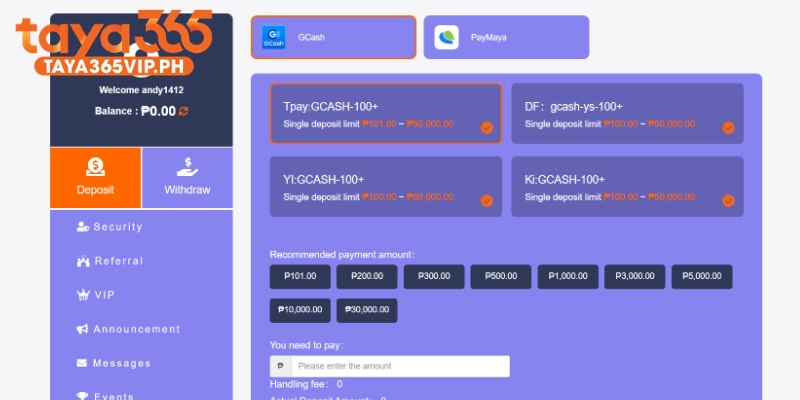
Tap the Deposit button on the homepage or open the main account menu and select Deposit. This opens the cashier, where all available payment channels are listed.
Step 3: Select payment gateway and enter amount
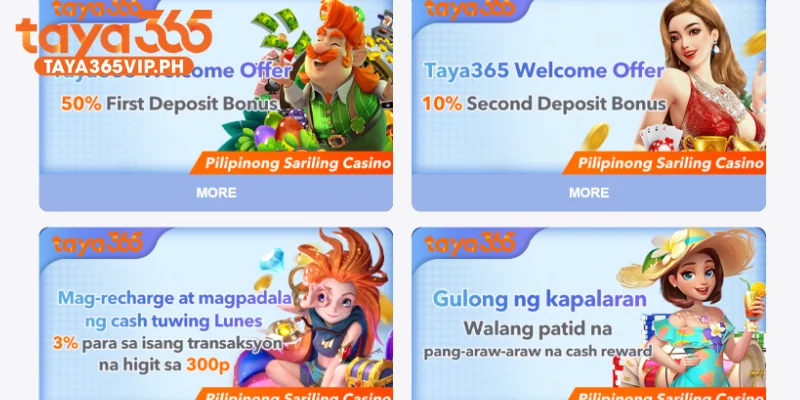
Choose your preferred channel, either GCash, Maya or Bank Transfer. Then type your deposit amount, making sure it meets the minimum deposit shown for that channel. If you plan to claim a promotion, select it in the bonus field before you confirm.
Step 4: Complete payment and verify balance
Authorize the payment inside your wallet or banking app and take a screenshot of the receipt. Return to Taya365 and confirm that the real money balance now shows in your main wallet. If the amount is not credited after a few minutes, go to the troubleshooting section below.
Top Taya365 deposit channels in the Philippines
Taya365 groups its payment options into three main channels so you can fund your account with the app you already use every day.
GCash fast deposit
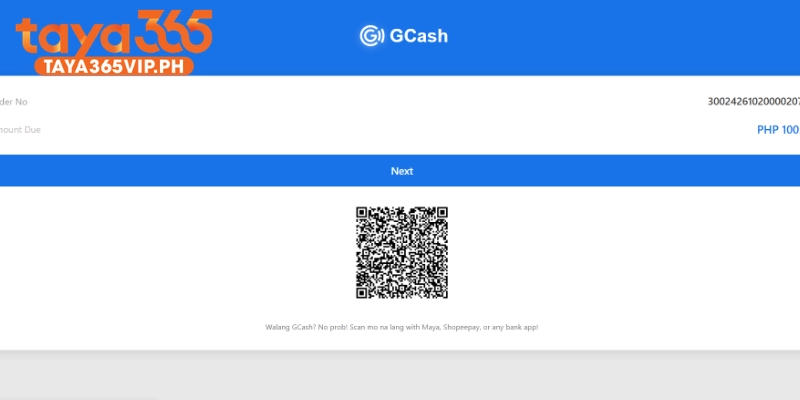
GCash is the quickest way to top up your Taya365 balance. You can pay through the direct GCash portal, which opens your GCash app automatically, or scan the QR code shown in the Taya365 cashier.
- Direct portal: tap GCash in the cashier and you are redirected to your GCash app to approve the payment.
- QR code scanning: open GCash, tap “Scan QR” and point your camera at the code on screen.
- Instant crediting: standard GCash deposits reflect in your Taya365 wallet within moments.
- No Taya365 transaction fee: Taya365 does not charge a fee on GCash deposits.
Maya and QR Ph payment options
Maya works much like GCash and is a strong backup when your main wallet is under maintenance. To authorize a Maya deposit:
- Choose Maya in the Taya365 cashier and enter your amount.
- Confirm the request to open the Maya payment page or app.
- Log in to Maya and enter the one time PIN sent to your mobile number.
- Approve the payment and return to Taya365 to check your balance.
QR Ph is the national QR standard of the Philippines. When the QR Ph option is available, you can scan a single code using any participating bank or wallet app, which makes cross platform transfers instant even if you do not use GCash or Maya.
Local bank direct transfer
Bank transfer suits players who prefer to move larger amounts straight from a savings or checking account. Taya365 accepts transfers from major Philippine commercial banks such as UnionBank, BDO and BPI.
Follow these rules to make sure your bank deposit is matched to your account:
- Copy the exact receiving account details shown in the cashier for that session.
- Transfer the exact amount you entered in the Taya365 deposit form.
- Save the Reference No. from your banking app and enter it in the deposit form if asked.
- Keep a screenshot of the completed transfer until the funds appear in your wallet.
Taya365 deposit bonuses and exclusive rewards
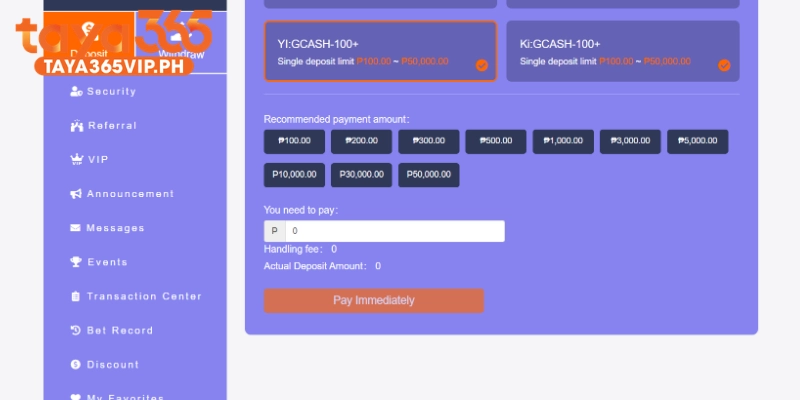
Your deposit can unlock extra playing funds through two main types of promotions.
100% welcome deposit bonus for new players
New members can claim a first deposit match bonus that adds extra funds for slots and live games. To claim it:
- Register a new Taya365 account and complete your profile.
- Open the Promotions page and read the welcome offer terms.
- Select the welcome bonus in the cashier before you confirm your first deposit.
- Check that the bonus amount appears in your wallet after the payment.
The match rate, maximum bonus and turnover are shown on the Promotions page, so check them before each claim.
Daily reload bonuses and red envelope drops
Returning players receive regular perks on top of the welcome offer.
- Reload bonuses: recurring deposit match offers on selected days of the week.
- Red envelope drops: cash rewards you can open from the homepage during member events.
- Daily login rewards: small cash bonuses for players who log in and play regularly.
Each offer has its own minimum deposit and turnover, so read the terms before you opt in.
Essential tips and deposit troubleshooting
A few simple habits will keep your deposits smooth and your withdrawals free from delays.
Turnover and wagering requirements
Turnover is the total amount of valid bets you must place before you can withdraw bonus related funds. For example, a 1x turnover on a ₱1,000 bonus means you need ₱1,000 in valid bets first. Each promotion states whether the turnover applies to the bonus only or to the deposit plus bonus. Some games may count less toward turnover, and canceled or voided bets do not count. Track your progress in the bonus or account history section before requesting a withdrawal.
Minimum and maximum deposit limits
Deposit limits depend on the channel you choose. The table below shows the general per transaction limits.
| Channel | Minimum deposit | Maximum per transaction |
| GCash | ₱100 | ₱50,000 |
| Maya | ₱100 | ₱50,000 |
| QR Ph | See cashier | See cashier |
| Bank transfer | See cashier | See cashier |
Fixing delayed deposits and system maintenance
Most delays happen when GCash, Maya or a bank runs scheduled maintenance. If your balance does not update:
- Do not pay again. A second payment can create a double charge.
- Save your Reference No. or Ref ID from the GCash, Maya or bank receipt.
- Check the transaction status in your wallet app to confirm the money was deducted.
- Wait a few minutes and refresh your Taya365 wallet.
- Switch channels during maintenance, for example use Maya while GCash is down.
If the funds still do not appear, contact Taya365 Live Customer Support, available 24/7 through live chat on the website. You can also reach the team by email, Facebook or Telegram. Send your username, deposit amount, payment time, Reference No. and receipt screenshot so the team can credit your balance manually.
Taya365 is for players aged 18 and above. Set a deposit budget before you play and only deposit what you can afford to lose.
