
Taya365 withdrawal lets you move your winnings, rewards and cleared bonus funds to GCash, Maya or a local bank account in a few steps. Digital wallet payouts are usually the fastest option, while bank transfers can take longer depending on your bank. Most failed or delayed withdrawals come from three issues: unmet turnover, unverified accounts and mismatched account names. This guide shows you how to cash out correctly the first time and what to do if your request gets stuck.
How to withdraw from Taya365 step by step
A Taya365 withdrawal has two stages: binding your payout account once and then submitting each request.
Bind your GCash or Maya wallet
Binding a wallet links your payout destination to your Taya365 account.
- Log in to your Taya365 account on the website or app.
- Open My Account or the Withdraw section.
- Select GCash or Maya as your withdrawal method.
- Enter your mobile number and wallet account name exactly as they appear in the wallet app.
- Save the details and complete any OTP check sent to your phone.
Bind your local bank account
Bank binding needs a few more details than a digital wallet.
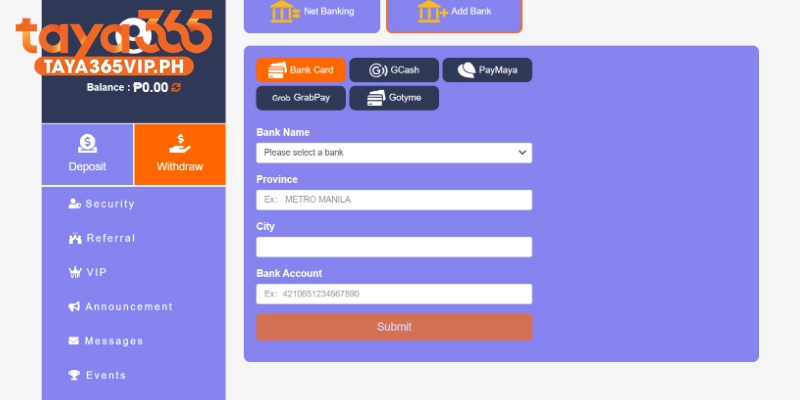
- Go to the Withdraw section and choose Bank transfer.
- Select your bank from the list.
- Enter your account number and account holder name.
- Add the branch or location if the form asks for it.
- Double check every digit and tap Confirm.
Submit and confirm your withdrawal request
Once your payout account is saved, each withdrawal takes under a minute to submit.
- Move any balance from game wallets to your main account if your balance is split.
- Make sure all your bets are settled. Open bets can block a withdrawal.
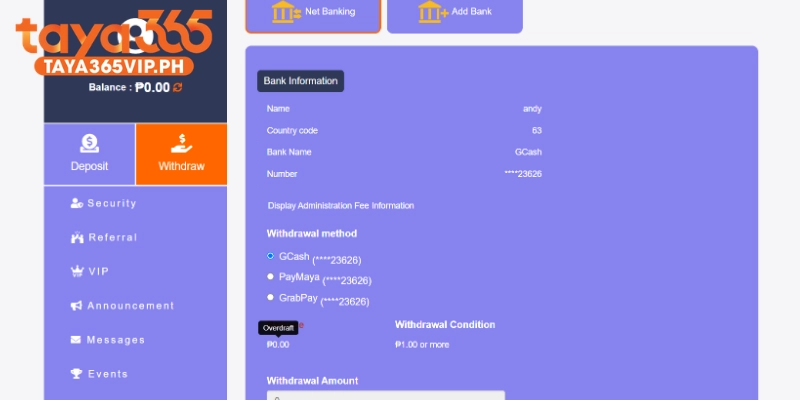
- Open Withdraw and select your saved GCash, Maya or bank account.
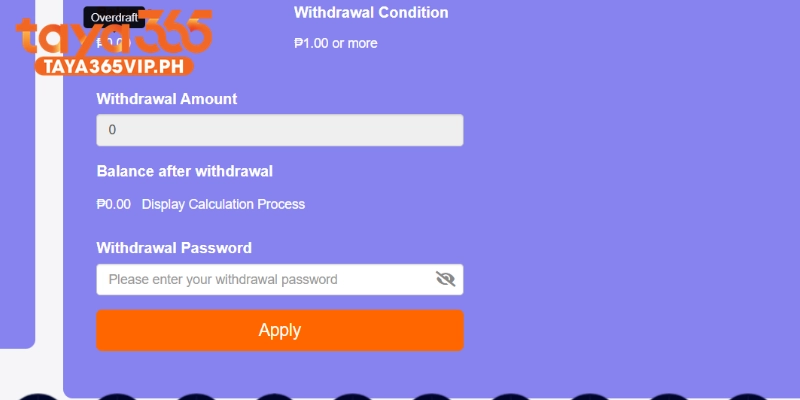
- Enter an amount equal to or lower than your available balance and within the limits shown.
- Enter your withdrawal password or OTP if the cashier asks for one.
- Review the details and tap Submit.
- Track the status in your transaction history. It moves from Pending to Success once the payout is sent.
Taya365 withdrawal methods
Taya365 supports three main payout channels for players in the Philippines.
| Method | Best For | Typical Speed | Requirements |
| GCash | Fast everyday cash outs | Usually within minutes after approval | Verified GCash number under your registered name |
| Maya | Fast cash outs with higher wallet capacity | Usually within minutes after approval | Verified Maya account under your registered name |
| Local Bank Transfer (BDO, BPI, UnionBank) | Larger transaction amounts | May take longer depending on bank processing hours | Valid bank account under your registered name |
Taya365 withdrawal rules and limits
Three rules decide whether your withdrawal gets approved quickly or held for review.
Turnover requirements on bonuses
Turnover is the total amount you must bet before bonus funds and their winnings become withdrawable. When you claim a promotion, the bonus terms set a turnover target. Withdrawing before you reach it is one of the most common reasons a request fails. Check your turnover progress in the promotion or bonus section before you request a payout. If you have not claimed any bonus, standard deposit turnover rules may still apply, so read the cashier notes.
Minimum, maximum and daily caps
Every Taya365 withdrawal must fall within the limits shown in the cashier for your chosen method.
- Minimum per request: displayed when you select GCash, Maya or bank transfer
- Maximum per request: set by Taya365 and can differ by channel
- Daily caps: may apply on the Taya365 side and on your wallet side
GCash and Maya also apply their own wallet limits. A payout can fail if it pushes your wallet over its monthly or daily receiving limit, even when Taya365 approves it. Fully verified wallets carry higher limits.
KYC verification and name matching
Account verification (KYC) confirms you are the real owner of the account and the payout destination. You must be at least 21 years old to play and withdraw. Verification usually asks for a valid government ID and may ask for a selfie or proof of account ownership.
The most important rule: the name on your GCash, Maya or bank account must match the name registered on Taya365. Payouts to third party accounts are refused under money laundering rules. Complete KYC before your first big withdrawal to avoid a hold.
Taya365 withdrawal time by channel
Processing time depends on the payout channel, the time of day and whether your account needs a review.
| Channel | Usual Timeframe | Potential Causes for Delay |
| GCash | Minutes after approval | Wallet receiving limit reached, peak system traffic |
| Maya | Minutes after approval | Wallet receiving limit reached, peak system traffic |
| Bank Transfer (BDO, BPI, UnionBank) | Longer than e-wallets | Weekends, public holidays, outside regular banking hours |
| First Withdrawal / Large Amount | Longer than usual | Manual KYC verification, additional security review |
How to escalate a stuck withdrawal with support
Contact Taya365 customer support when a withdrawal stays pending well beyond the usual timeframe or fails without a clear reason. Live chat on the website or app is the quickest channel and runs 24/7. Use only the support links shown inside the official Taya365 site or app.
Prepare these details before you message support:
- Your Taya365 username
- The transaction ID or reference number
- The amount, method and time you submitted the request
- A screenshot of the transaction status
- Any error message you received
Clear details let the support team trace your payout without asking for more information. Never share your password or OTP with anyone, including people who claim to be Taya365 staff.
Taya365 withdrawal FAQ
These answers cover the questions players ask most about cashing out.
1. What is the Taya365 minimum withdrawal?
The minimum withdrawal is shown in the Taya365 cashier when you select GCash, Maya or bank transfer. It can differ by channel, so check the amount on that screen before you submit.
2. How long does a Taya365 withdrawal take?
GCash and Maya payouts usually arrive within minutes after approval. Bank transfers take longer and depend on your bank’s proceissue,ssing hours. First withdrawals and large amounts may need extra review time.
3. Why is my Taya365 withdrawal still pending?
A pending status usually means your request is in the queue, under review or waiting on the bank. Wait without submitting again, then contact live chat with your transaction ID if it stays pending for too long.
4. Should I withdraw to GCash or Maya?
Both are fast options for Filipino players. Choose the wallet that is fully verified under your registered name and has enough receiving limit left for the amount you want to cash out.
5. What happens if my withdrawal is rejected?
The balance returns to your Taya365 account after a rejection. Check your turnover progress, KYC status and saved account name, fix the issue and then submit a new request.

Cash out from Taya365 with confidence
A smooth Taya365 withdrawal comes down to preparation: verify your account, match your payout name, meet turnover, and stay within the cashier limits. GCash and Maya give you the fastest access to your winnings, while bank transfers suit larger amounts. If a request gets stuck, live chat support with your transaction ID is the quickest route to a fix.
